
When someone we love dies, people often look for a place online to remember them. There are many memorial websites to choose from, and most of them sound kind. The real differences are usually quieter than a homepage: what it costs, whether advertising appears beside a photograph, who can add memories, how the page is looked after over time, and whether it can hold a life in one place.
This is a calm, honest guide to those questions. It doesn’t rank websites, and it doesn’t ask you to decide today. It offers a clear checklist you can take to any option you’re considering, then explains how Memories answers each point, so you can compare with your eyes open.
What an online memorial website is
An online memorial website is a place on the internet that tells the story of a person’s life. Most pages include a photo, a few words about them, a gallery of pictures and videos, and space where family and friends can share memories. Some also carry practical details for a funeral or memorial service, so people near and far know what is happening.
A page can be private, or shared by link with the people you trust. There’s no right answer. Choose what feels safe and respectful for your family.
If you already know you’d like a page, and simply want help beginning, our step-by-step guide to creating an online memorial page walks through it gently. You may also like the benefits of online memorials, which explains why families make one at all.
Five questions worth asking
When you’re comparing websites, these five questions do most of the useful work. They’re the same questions we set out in our memorial page guide, opened out here so you can sit with them properly.
| What to look for | A question worth asking | What a clear answer looks like |
|---|---|---|
| Cost clarity | Is it free to start, and are any later fees written plainly? | You can begin without a credit card, and you can find the price without hunting. |
| Ads and tone | Is it private, secure and free of advertising? | A calm space, without ads sitting beside someone’s photo or their story. |
| Contributions | Can family and friends add messages, photos and memories? | People who cannot attend in person can still take part, and those additions are kept with the page. |
| Longevity | How is the page looked after as months turn into years? | There is a clear plan for keeping it accessible, and a clear cost if there is one. |
| All in one place | Can it hold a memorial page, photos, a tribute video and service details together? | You are not sending the video to one site, the guest book to another, and the service details somewhere else. |
They’re simply a way to choose with less guesswork, at a time when guesswork is tiring.
1. Cost clarity: can you start freely, and are the fees plain?
A fair memorial website will tell you, in ordinary language, whether you can begin without paying, and what you would pay later. Recurring fees, if there are any, should be easy to find before you’ve poured hours into a page.
You can start with Memories for free, with no credit card. If you continue, Memories is US$99 as a one-time fee, plus US$12 per life story per year (A$99 and A$12 in Australia).
If the costs are hard to find, that’s worth noticing. Clear costs are a kindness, especially now.
2. Ads and tone: is it private, secure and free of advertising?
Grief doesn’t mix well with advertising. A memorial page should feel like a quiet room, not a place where someone else’s product appears next to a photograph of the person you love.
It also helps to ask who can see the page. Some families want a page anyone can find. Others prefer a page shared only by link with people they trust. Either can be right.
Memories was built as a private, secure space. You can gather a life story, photos and a tribute video in one calm, ad-free memorial page.
3. Contributions: can others add photos and memories?
A page becomes richer when more than one person can add to it. An old workmate may remember a kindness you never heard about. A childhood friend may have a photo from 1968. Relatives who live far away, or who couldn’t travel for the service, still need a way to leave a few words.
Ask whether guests can add messages, photos and videos, and where those contributions go afterwards. A guest book that scatters across texts, cards and social comments is easy to lose.
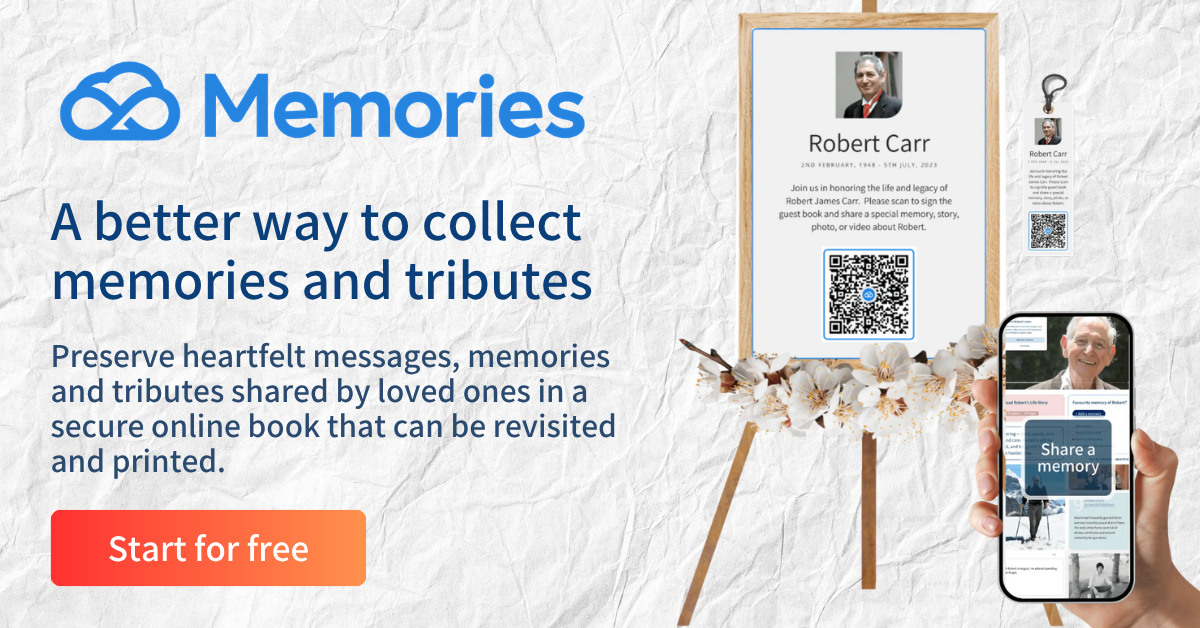
With Memories, each digital guest book has its own link and QR code. You can:
- print the QR code on the order of service
- download it as a poster for the entrance or a reception table
- print it as a keepsake bookmark
Guests scan the code with their phone and add a message, a photo or a video. Those contributions go into the memory book, so the family can keep them together.
4. Longevity: will the page still be there when you need it?
A memorial page is often started in the first days after a death. Many families find they need it later, too: on a birthday, on an anniversary, or on an ordinary Tuesday when someone simply misses them. Years from now, a grandchild may read it for the first time.
When you compare websites, ask how the page is hosted over time, and whether there is an ongoing cost to keep it accessible. A useful question is whether it will stay online for years, not just months.
With Memories, the ongoing amount to be aware of is US$12 per life story per year (A$12 in Australia), after the one-time fee. The aim is a page you can keep returning to, for as long as you need it.
5. All in one place: can it hold the page, the photos and the day itself?
It’s common, in a busy week, for a tribute video to live in one inbox, service details in another, photos in a family chat, and messages on scraps of paper. An online memorial website is most helpful when those things can sit together.
A useful test is whether one place can hold:
- the memorial page itself
- photos and memories from family and friends
- a tribute video
- service details, so people know where to be
Memories was made for exactly this. Alongside the page and the digital guest book, it can hold a tribute video and the details of the day. If you need an order of service, there are templates, a proof to review, and a print-ready PDF. If the words are hard to begin, Memories also has AI-assisted writers for an obituary, a eulogy or a biography, and our guide on how to write an online memorial for a loved one can help you find a first sentence.

How Memories fits
If you take the checklist above to Memories, the answers are straightforward:
- You can start for free, with no credit card. If you continue, the cost is US$99 one-time, plus US$12 per life story per year (A$99 and A$12 in Australia).
- The page is a private, secure, ad-free space, which can be private or shared by link.
- Family and friends can add messages, photos and videos through a unique link and QR code, printed on an order of service, poster or bookmark. Those contributions go into the memory book.
- There is a clear yearly amount for keeping a life story accessible online.
- The memorial page, photos, tribute video and service details can live together, rather than in several different places.
That’s not an argument that every family should choose the same website. It’s an honest account of what Memories is for, so you can weigh it against whatever else you’re considering.
Frequently asked questions
What should I look for in an online memorial website?
Look for clear costs, a private and ad-free space, a way for other people to add photos and memories, a plan for keeping the page accessible over time, and the ability to hold a memorial page, photos, a tribute video and service details in one place.
Are online memorial websites free?
Some let you start without paying. Memories is free to start, with no credit card. If you continue, it is US$99 as a one-time fee, plus US$12 per life story per year (A$99 and A$12 in Australia). Whatever website you consider, the fees should be easy to find before you begin.
Can family and friends add photos and messages?
They should be able to. With a Memories digital guest book, guests can add messages, photos and videos through a unique link and QR code. Those contributions go into the memory book.
Is an online memorial page private?
It can be. Some families want a page anyone can find; others prefer a page shared only by link with people they trust. Memories pages are private, secure and free of advertising. Choose the level of sharing that feels respectful for your family.
Can one website hold a memorial page, guest book and service details?
Yes, if you choose a website built for that. Memories can hold a memorial page, photos, a tribute video and service details together, with a digital guest book and an order of service that downloads as a print-ready PDF.
How do I create an online memorial page?
Begin with one photo and a few words, then add more when you are ready. Our gentle step-by-step guide explains how to create an online memorial page, from choosing a photograph to inviting others to share their memories.
A calm place to begin
Choosing an online memorial website doesn’t have to be another heavy task. Ask the five questions, read the answers slowly, and pick the place that feels clear and kind.
An online memorial page is not something you finish. It grows. On their birthday, someone adds a photo. On the anniversary, someone writes a few lines. Years from now, someone who never met them may read it for the first time.
Not a profile. But a place to remember them, together.
When you’re ready, you can start a memorial page with Memories.